
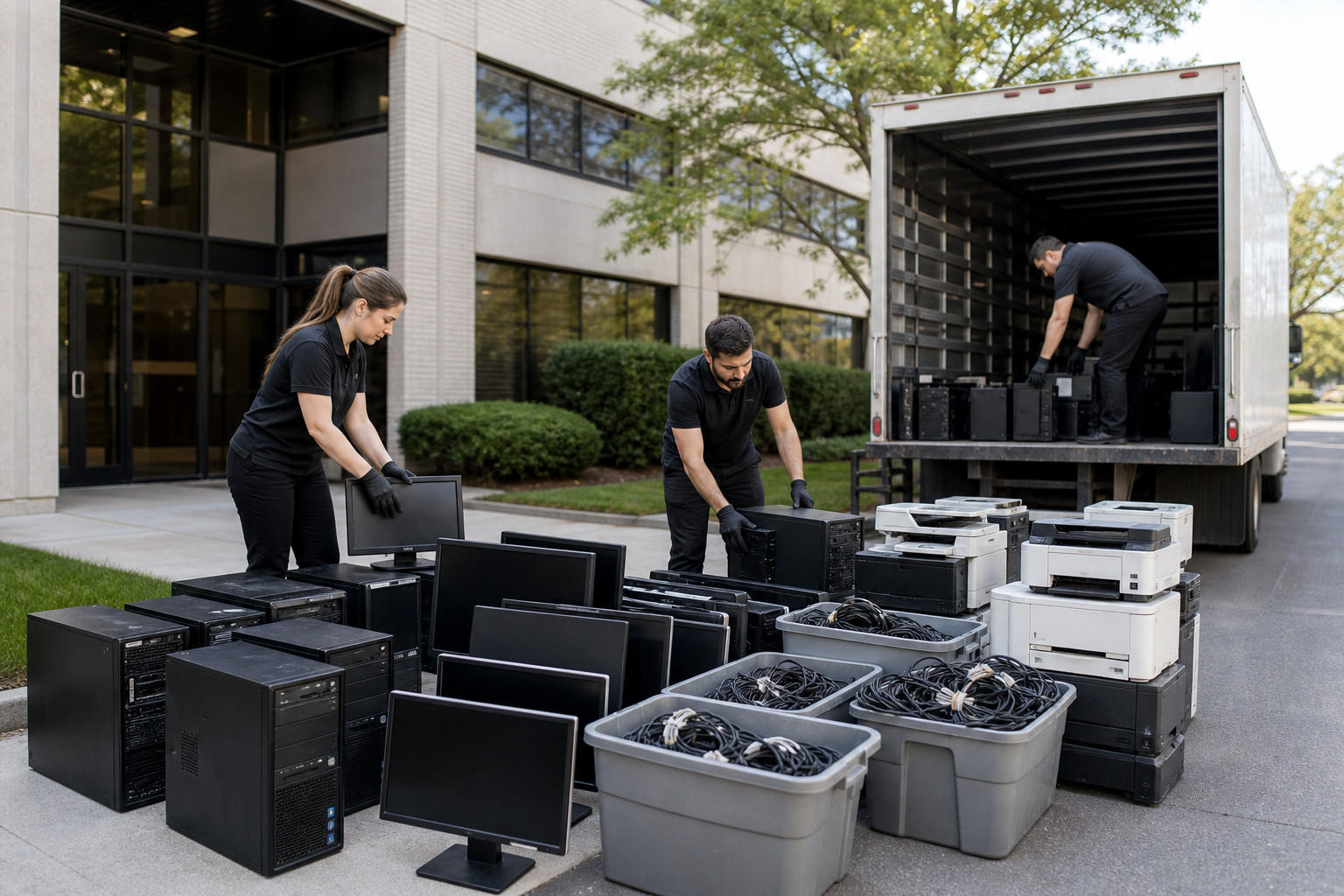
Small businesses in Toronto can start e-waste recycling by inventorying computers, monitors, printers, TVs, peripherals, cables, and circuit boards, then separating electronics from general waste and protecting stored data. Quick Scrap Metal’s Etobicoke location is described as accepting electronics and e-waste, but confirm each business device category before transport.
Build a Business Inventory Before Asking
E-waste recycling is the controlled handoff of unwanted electrical and electronic equipment for material recovery or responsible handling instead of ordinary disposal. For a small business, that can include office equipment, retail devices, workshop electronics, appliances, cables, and metal components, but acceptance depends on the specific item and its condition.
Start with these common categories
- Computers and laptops: desktops, laptops, towers, and related equipment. Storage devices need data protection before handoff. A computer recycling preparation plan can help your team identify devices that still contain business information.
- Monitors and televisions: screens, displays, and TVs. Separate them from loose metal and protect the glass or panel during loading.
- Printers and peripherals: printers, keyboards, mice, scanners, and similar office equipment. Remove paper, loose accessories, and personal information before transport. For printers with stored data, follow a dedicated printer recycling and data checklist.
- Cables and accessories: power cords, extension cords, chargers, adapters, and other wiring. Keep loose cables together and separate them from general waste.
- Printed circuit boards and electronic components: identify these items in your inquiry and confirm them before delivery.
- Appliances and mixed metal: washers, dryers, microwaves, stoves, A/C units, motors, steel, copper, aluminum, brass, and stainless steel may form part of a mixed business load. Appliances with refrigerants, fluids, or batteries need specific confirmation before movement.
Phones, servers, networking equipment, hard drives, batteries, swollen devices, and unusual industrial electronics should be described before you travel. Do not assume that a label, silver-coloured casing, or magnet test proves how every component will be classified. Businesses can also review electronics recycling options in Etobicoke while building their item list.
Sort the Load Before You Move It
A small business can make its recycling handoff easier by separating equipment into clear groups before loading a vehicle. Sorting gives the recycler a more useful description of the inventory, helps staff account for every asset, and prevents unrelated waste from being mixed with recyclable material. Related reading: Small Business Bookkeeping Help: DIY or Outsource?.
- Make an inventory: Count computers, monitors, printers, phones, TVs, cables, boards, appliances, and other major categories. Record approximate weight or dimensions for bulky items.
- Separate electronics from general waste: Remove cardboard, packaging, food waste, office rubbish, wood, and loose debris that are not part of the electronic equipment.
- Group similar items: Use separate bins or pallets for computers, screens, printers, cables, circuit boards, appliances, ferrous metal, and non-ferrous metal.
- Consolidate small parts: Place chargers, adapters, keyboards, mice, and loose cables in labelled boxes so they do not disappear under heavier equipment.
- Label uncertainty: Mark devices that contain storage, batteries, fluids, or unknown components. Ask about those items before dispatching staff.
Sorting is especially useful when a business has both e-waste and scrap metal. Material type, grade, cleanliness, weight, preparation, and market conditions can affect a scrap assessment, so separated cables, accessories, and metal groups are easier to describe and organize at drop-off. The practical principles are explained in this guide to e-waste preparation and scrap assessment factors.
Protect Business Data Before Handoff
Recycling a device does not automatically mean its data has been wiped, destroyed, certified, or kept under a documented chain of custody. Your business remains responsible for deciding what information must be preserved, removed, or destroyed before equipment leaves your control.
- Identify storage-enabled equipment: Flag computers, laptops, phones, tablets, printers with internal memory, copiers, servers, external drives, USB devices, and networking equipment.
- Preserve required records: Back up approved business records before deleting anything. Confirm that accounting, customer, employee, tax, and operational information is retained according to your internal policy.
- Remove accounts and access: Sign out of cloud accounts, email, device-management systems, and user profiles. Remove screen locks, activation locks, and remote-management assignments where your IT process allows.
- Reset or wipe the device: Use the business’s approved process for the operating system and storage type. A basic factory reset may not meet a company’s security or contractual requirements.
- Record the handoff: Keep an inventory of serial numbers or asset tags if your records require it. If you need a certificate, witnessed destruction, or documented chain of custody, arrange that service separately before sending the device for recycling.
A recycler’s acceptance of an electronic item does not by itself promise data wiping or certified destruction. If a device cannot power on, contains a removable drive, or is subject to a customer or regulatory retention requirement, ask your IT or information-security provider how to handle it before recycling.
Choose the Route That Fits Your Business Operation
Drop-off is usually the simpler option when your load is small, consolidated, transportable, and ready to unload. Any pickup arrangement must be confirmed for the specific load, location, access conditions, and equipment size before staff or a vehicle are assigned.
| Business situation | More practical first step | Information to prepare |
|---|---|---|
| A few computers, screens, printers, and boxed cables | Prepare a drop-off inquiry | Acceptance, data status, vehicle space, and any payment terms |
| Large screens, appliances, or heavy equipment | Ask about collection or another arrangement | Item dimensions, access, stairs, loading needs, timing, and fees |
| Mixed electronics and scrap metal | Describe each category before travel | Whether e-waste and metal are assessed separately and how uncertain items are handled |
| Damaged, leaking, swollen, or battery-containing equipment | Request specific handling instructions | Whether the item is accepted and how it must be isolated or transported |
Drop-off is promoted at 407 Rexdale Blvd in Etobicoke. Any pickup arrangement must be confirmed for the specific business load because e-waste pickup minimums, regular collection schedules, fees, and loading assistance are not established here. Give the recycler your categories, quantity, location, and access details before planning the job.
Prepare a Quote-Ready Business Inquiry
A useful inquiry lets the recycler assess the job before your staff load a truck. Send a concise description instead of saying only that you have “some electronics.” The same information also helps your business estimate staff time, vehicle space, and the number of trips required.
- Business details: company name, contact person, phone number, and email.
- Location: Toronto or Etobicoke address, loading area, floor level, stairs, elevator, doorway width, dock access, and parking restrictions.
- Inventory: item categories, approximate counts, estimated weight, and dimensions of unusually large equipment.
- Condition: working, non-working, damaged, incomplete, wet, or contaminated equipment.
- Data status: whether devices have been backed up, signed out, reset, wiped, or held for separate destruction.
- Mixed material: copper wire, aluminum, steel, brass, appliances, motors, PCBs, or other scrap included in the same load.
- Transport plan: vehicle type, preferred timing, and whether your team can load and unload safely.
- Questions: acceptance, pickup availability, payment for qualifying material, required documents, and treatment of rejected items.
Ask specifically whether Quick Scrap Metal offers account pricing or regular business pickup for your location. Those terms are not established by the available information, so they should be confirmed rather than assumed. Ask whether payment applies to your specific e-waste categories. Cash payment is not established for every type of e-waste.
Move and Transport Electronics Without Creating a New Problem
Disconnect equipment fully, remove loose parts, and protect screens with suitable padding. Keep small accessories in closed, labelled containers, place heavier items low in the vehicle, and secure the load so it cannot slide or fall during braking.
Use a cart for dense equipment and team lifting for bulky units. Do not stack heavy items on fragile monitors, televisions, printers, or laptops. Confirm that the vehicle’s payload and interior dimensions suit the load, especially if it also contains metal or appliances.
Safety note: Do not move a leaking, swollen, hot, or visibly damaged battery as ordinary scrap because it can create a fire, chemical, or transport hazard. Isolate it from normal equipment and request handling instructions before dispatch.
Know the Ontario E-Waste Context Without Using Outdated Terms
Ontario’s former Waste Electrical and Electronic Equipment program is no longer the current arrangement. The province terminated that program during the transition to producer responsibility, with the Electrical and Electronic Equipment Regulation applying from January 1, 2021, under the Resource Recovery and Circular Economy Act. Ontario’s official notice explains that transition.
For a small business, the practical lesson is simple: use current terms such as e-waste recycling or electronic waste recycling, and confirm the acceptance and documentation requirements for your actual load. Do not rely on an old WEEE reference to establish that a recycler accepts a particular device or provides a specific record.
Two Small-Business Clear-Outs, Two Practical Plans
Hypothetical example: a small office refresh
A five-person office has four desktop computers, four monitors, two printers, several keyboards, and a box of cables. The office manager backs up required records, signs users out, wipes the storage devices under the company’s IT process, labels the equipment, and separates the cables from the screens.
Because the load is consolidated and transportable, the manager asks about acceptance and prepares a drop-off at the Etobicoke location. The inquiry includes the item count, data status, and any printer or storage details instead of assuming every device receives the same treatment.
Hypothetical example: a retail or workshop clear-out
A retail unit or workshop has large displays, appliances, networking equipment, damaged devices, loose cables, and a quantity of copper and steel. The business has limited loading space and cannot safely move every item with its available staff.
Here, the first step is a detailed service inquiry, not loading the truck. The business sends photos or dimensions where useful, describes access constraints, separates ordinary scrap metal from uncertain electronics, and asks whether collection is available for that location. The route changes because of size, access, and handling risk, not because a particular unverified minimum is assumed.
What to Confirm Before You Send Staff or a Truck
Before dispatch, ask these questions and write down the answers:
- Are computers, monitors, printers, phones, networking equipment, batteries, and PCBs accepted as described?
- Are e-waste items assessed separately from copper, aluminum, steel, brass, and other scrap metal?
- Does payment apply to the specific categories in this load, or only to qualifying scrap material?
- Is pickup available for this address, quantity, equipment size, and access condition?
- Will the business need to provide loading labour, a vehicle, a liftgate, or special containers?
- Which identification, inventory, ownership, or business documents are required?
- How should batteries, damaged devices, fluids, refrigerants, and unknown components be isolated?
- What happens to an item that cannot be accepted?
- What receipt or weight information will be available for qualifying scrap?
Accepted materials may be assessed for recycling or scrap value at handoff, while uncertain or unsuitable items need a decision before travel. If part of the load is rejected, keep it separate and ask for an appropriate alternative instead of leaving it mixed with accepted equipment.
Plan the Next Step With Quick Scrap Metal
Quick Scrap Metal is located at 407 Rexdale Blvd in Etobicoke, near HWY 27 and Rexdale, and serves Toronto and the broader GTA. Confirm current hours and load requirements through the contact page before dispatch.
Send Quick Scrap Metal your inventory, approximate quantities, address, access conditions, data status, and preferred timing, then ask whether a drop-off or another arrangement fits. For the relevant service details, review electronics and e-waste recycling services before making the trip.