
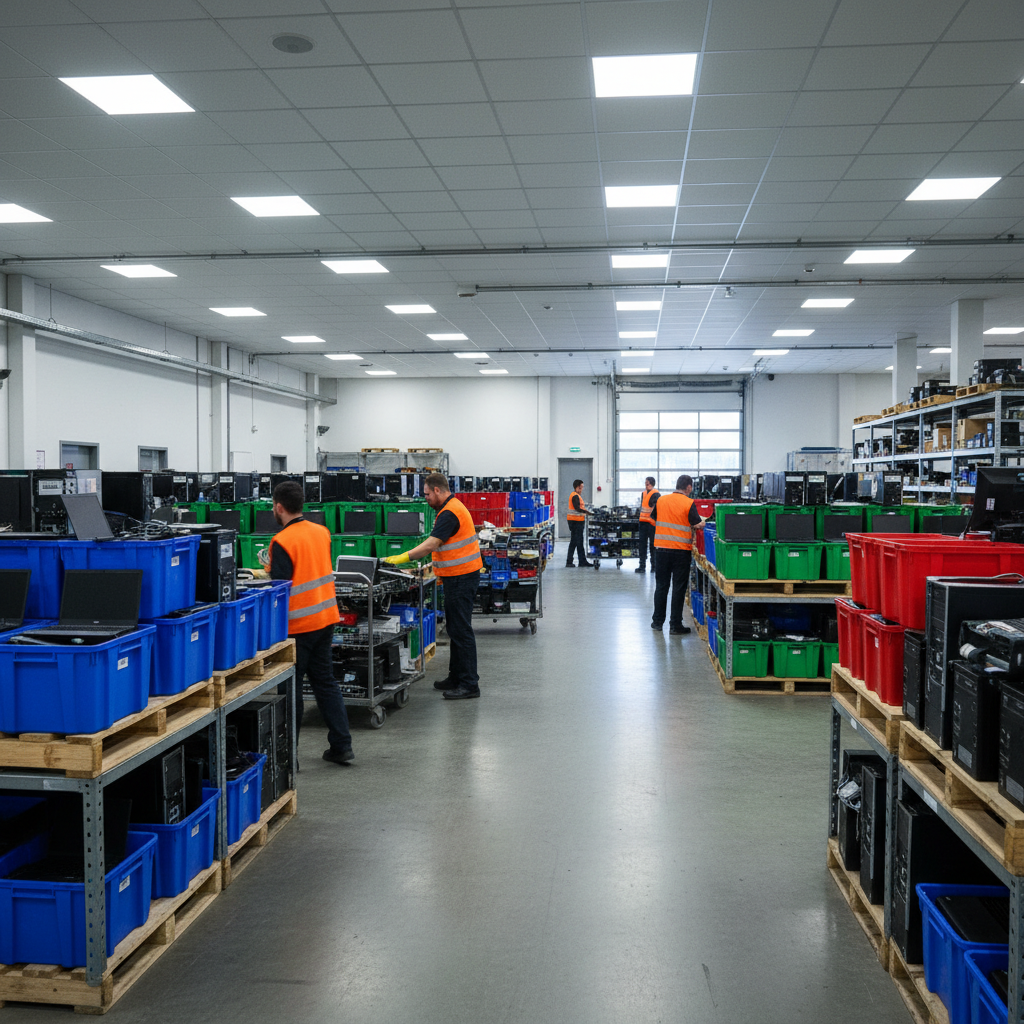
A computer recycling center is a facility that safely collects, wipes, and dismantles desktops, laptops, and related electronics so reusable metals and components can be recovered. At 407 Rexdale Blvd in Etobicoke, Quick Scrap Metal offers e-waste drop-off that turns clutter into responsible recycling, with convenient hours and same-day service for households and businesses.
By Preet Dass | Last updated: 2026-05-01
At a Glance: What You’ll Learn in This Guide
This complete guide explains what a computer recycling center does, why it matters, how drop-off works at Quick Scrap Metal in Etobicoke, and the exact steps to protect your data. You’ll see accepted items, preparation checklists, and local tips for Toronto-area households, contractors, and small businesses.
- What it is: Plain-English definition of a computer recycling center and how it differs from junk removal.
- Why it matters: Environmental and privacy benefits you feel right away.
- How it works: The step-by-step process from drop-off to material recovery.
- What to bring: Laptops, towers, monitors, cables, batteries, and accessories.
- Data safety: Practical data-wipe methods you can do before you arrive.
- Local tips: Etobicoke and Toronto pointers for easy, fast drop-offs.
- Action tools: Checklists, labeling tips, and a simple prep workflow.
Local considerations for Etobicoke
- Plan your visit around weekend traffic near Woodbine Mall & Fantasy Fair; late weekday hours often mean faster, low-wait drop-offs.
- Winter brings snow and slush—pack electronics in plastic bins or bags to keep moisture away from components.
- For mixed loads (computers plus scrap metal), stage items by type in your trunk or truck bed so unloading at 407 Rexdale Blvd is efficient.
What Is a Computer Recycling Center?
A computer recycling center is a specialized facility that accepts desktops, laptops, and accessories, then wipes data, dismantles devices, and sorts parts for safe reuse and recycling. Unlike general junk services, certified e-waste handlers prioritize data protection and material recovery, turning old tech into valuable metals and components.
Put simply, a computer recycling center turns old tech into feedstock for manufacturing. Teams remove batteries, storage media, and plastics. Then they separate boards, wiring, and metal housings so copper, aluminum, steel, and precious-metal-bearing PCBs can re-enter supply chains.
- Scope of items: Computers, laptops, servers, monitors, keyboards, mice, cables, chargers, routers, and small office electronics.
- Data handling: Drives are wiped or removed. Many centers segregate storage media for specialized processing.
- Material recovery: Non-ferrous metals (copper, aluminum, brass), ferrous metals (steel), stainless steel, and circuit boards are diverted from landfill.
At Quick Scrap Metal, e-waste intake fits alongside metal recycling. That means a single stop for electronics recycling and common scrap like steel, aluminum, and copper—ideal when you’re clearing a basement, garage, or jobsite.
Why Computer Recycling Matters in Etobicoke and Toronto
Responsible computer recycling protects privacy, reduces landfill pressure, and recovers metals for new products. In Etobicoke and the Toronto metro, drop-off at 407 Rexdale Blvd combines quick service with proper downstream handling—so households and contractors can declutter and do right by the environment in one trip.
Old computers pile up fast. Hard drives can hold sensitive files long after devices stop working. Monitors and batteries contain materials that shouldn’t enter the waste stream. Recycling keeps metals in use and helps prevent improper disposal.
- Data protection: Removing or wiping drives limits exposure of personal and business info.
- Environmental impact: Recovered copper, aluminum, and steel support circular manufacturing.
- Space savings: One trunk-load freed up at home or on the truck often translates into immediate, visible results.
- Local convenience: Quick Scrap Metal is easy to reach near HWY 27 & Rexdale, with late weekday hours and Sunday availability.
Because Quick Scrap Metal also buys scrap metal, mixed loads are simple. Bring towers and laptops with radiators, wire, and small appliances—staff will sort quickly so you’re back on the road in minutes.
How a Computer Recycling Center Works (Step-by-Step)
The process is simple: unload, verify accepted items, remove or secure data-bearing parts, weigh and sort, then move materials to downstream partners for certified recycling. At Quick Scrap Metal, trained staff streamline unloading, separate components, and help you protect your data before material recovery begins.
- Check accepted items: Gather laptops, desktops, monitors, cables, keyboards, routers, and small electronics. Bag loose parts.
- Prepare for data safety: If possible, remove the drive (2.5″ or 3.5″). If not, back up and wipe data before your visit.
- Arrive and unload: Park in the designated area. Staff will guide you, sort items by type, and separate batteries.
- Sorting and staging: Devices, boards, wire, and metal housings are separated for safe downstream handling.
- Downstream recycling: Materials move to processors where metals and components are refined or repurposed.
Want to combine computers with scrap? Review our practical pointers in the Etobicoke scrap guide, then stage electronics separately from ferrous (steel) and non-ferrous (copper, aluminum, brass) so unloading is faster.

In our experience, a well-staged trunk or truck bed—computers to the left, cords and keyboards boxed, batteries in a small container—can cut unloading time significantly and reduce callbacks for forgotten accessories.
Types of Computer Recycling Options (Compared)
You have several ways to recycle computers: local drop-off at a computer recycling center, retail take-back, municipal events, and mail-back kits. Local centers like Quick Scrap Metal offer the fastest, most flexible option—especially for mixed loads that include metal, appliances, and electronics.
| Option | Best For | Pros | Considerations |
|---|---|---|---|
| Local computer recycling center | Households, contractors, small businesses in Etobicoke/Toronto | Fast drop-off, staff help, accepts wide range, mix with scrap metal | Bring your own transport; prep data beforehand |
| Retail take-back | Single devices or brand-specific returns | Convenient if you’re already shopping | Often limited items; no mixed metal loads |
| Municipal collection event | Occasional cleanouts | Community-focused, seasonal availability | Specific dates only; longer lines |
| Mail-back program | Smaller items and remote returns | No travel; easy for a few gadgets | Packaging effort; size/weight limits |
If you’re already planning a load of copper wire, radiators, or stainless alongside laptops and routers, a single drop at 407 Rexdale Blvd is the most efficient path. Many customers also browse our metal recycling in Toronto tips to prep mixed loads.
Accepted Items and Smart Prep
Bring laptops, towers, monitors, cables, keyboards, mice, routers, modems, and small office electronics. Pack accessories in clear bins, remove or wipe drives when possible, and label any devices that won’t power on. This speeds sorting and ensures proper handling of data-bearing parts.
Commonly accepted at computer recycling centers
- Desktops, laptops, Chromebooks, and mini PCs
- Monitors and small TVs
- Keyboards, mice, webcams, headsets, speakers
- Routers, modems, switches, and small network gear
- Chargers, power supplies, cables, and extension cords
- Printers and multi-function devices (where accepted)
Quick Scrap Metal specialties (Etobicoke)
- Computers and laptops, plus e-waste recycling for peripherals and small devices
- Mixed-load convenience: ferrous and non-ferrous metal, appliances, and electronics in one stop
- Extended hours, open late weekdays and Sundays for flexible drop-offs
Preparation checklist
- Back up important files to cloud or an external drive.
- Sign out of accounts and deauthorize software (email, browsers, media apps).
- Remove or wipe storage drives when feasible.
- Bundle cords with zip ties; label bins by category.
- Keep batteries separate in a small container.
For more mixed-load prep ideas, explore our on-the-ground insights in the scrap metal recycling Etobicoke hub and the practical iron scrap guide.
Data Wiping and Privacy (Do This Before Drop-Off)
Protect your privacy by backing up, signing out of accounts, and wiping or removing drives. If you can’t remove the drive, use a reputable wipe utility to overwrite data. Label devices “Drive Removed” or “Drive Wiped” to simplify intake and speed up your drop-off.
Simple, effective data-wipe approaches
- Remove the drive: Unscrew side panel, disconnect SATA/power (desktops) or remove bottom panel (laptops) to pull the 2.5″/3.5″ drive.
- Use built-in reset: Many operating systems include a “reset this PC” option that removes files and apps.
- Run a wipe utility: Use well-regarded tools that overwrite data on hard drives or securely erase SSDs.
Labeling makes intake faster
- “Drive Removed” for devices without storage installed
- “No Power” for dead systems (still recyclable)
- “Accessories Inside” if cords and dongles are bagged in the case
Need help staging a mixed load that includes wire and electronics? Our short primer on ferrous recycling in Etobicoke explains how to separate steel from non-ferrous so our crew can unload your tech and metals quickly.
Best Practices for Fast, Safe Drop-Off
Sort by category, secure loose items, and keep batteries separate. Arrive during off-peak windows if possible. Clear labeling, sturdy bins, and a quick pre-check at home reduce your time on site and help our team recycle every component safely and efficiently.
- Sort items: Computers and laptops in one bin; accessories in another; batteries in a small container.
- Protect screens: Wrap or face monitors inward to avoid scratches during transport.
- Stage metal separately: Keep copper wire, aluminum, stainless, and steel apart from electronics.
- Use clear bins: Transparent totes help our team identify contents at a glance.
- Off-peak visits: Late weekdays are typically less busy than midday Saturdays.
These habits also make it easier to integrate other recyclables on the same run—appliances, small motors, and metal offcuts—without slowing down your electronics intake.
Tools and Local Resources to Make It Easy
Streamline your trip with a short checklist, labeled bins, and simple drive-wipe steps. For larger cleanouts, consider pairing e-waste with metal recycling and household decluttering services to minimize runs and make one efficient stop at 407 Rexdale Blvd.
- Prep checklist: Back up, sign out, remove/wipe drives, bag cords, label bins.
- Load plan: Heaviest items closest to the tailgate; batteries in a small container for easy handoff.
- Mixed-load ready: If you’re also bringing metal, browse our best scrap in Etobicoke insights to organize by type.
- Community cleanups: For broader decluttering, local services like greener junk removal can complement a single drop-off run.
- Home projects tie-in: Renovation planning often uncovers old tech; see area remodel resources such as Etobicoke project support to time your recycling day with other work.
- Eco-how-to reads: If you enjoy sustainability ideas across the home, this eco disposal primer reinforces good sorting habits that also apply to e-waste.
Real-World Examples from Our Etobicoke Yard
Homeowners, contractors, and small offices use Quick Scrap Metal as a one-stop drop for computers plus metal. Real scenarios show how sorting, labeling, and off-peak timing reduce unload times while ensuring data-bearing parts are handled correctly and metals are recovered responsibly.
Home office reset
A family near Flagstaff Park cleaned out two laptops, a tower, and a shoebox of cords. They labeled one laptop “Drive Removed,” put all chargers in a clear tote, and arrived midweek evening. Intake finished quickly and they left with a decluttered home office and peace of mind.
Contractor truck unload
A small contractor doing a retail refresh sorted low-voltage wire and old POS equipment. They boxed routers and keypads and staged wire separately. The mixed load went through in minutes because items were pre-sorted—computers to e-waste, wire to non-ferrous, brackets to steel.
Startup equipment refresh
A startup in Toronto replaced eight desktops and monitors. They performed built-in OS resets, removed a few drives, and labeled each unit. Clear bins for keyboards and mice kept accessories together. Our crew verified labels and moved everything to the right streams efficiently.
Garage-to-trunk weekend run
On a Sunday, a homeowner combined an old desktop, a microwave, and aluminum siding offcuts. Staff directed electronics to e-waste and metals to the appropriate piles. One stop, two checkmarks off the weekend list.

Your Computer Recycling Center in Etobicoke
Quick Scrap Metal at 407 Rexdale Blvd functions as your local computer recycling center with extended hours, fast intake, and mixed-load convenience. Bring laptops, towers, and peripherals alongside metal, appliances, and wire—our team will sort quickly and route every item to safe, responsible recycling.
- One-stop drop: Computers, small electronics, appliances, and scrap metal together.
- Easy access: Near HWY 27 & Rexdale, minutes from Woodbine Mall & Fantasy Fair.
- Customer-first: Late weekdays and Sunday hours fit real schedules.
- Local know-how: Tips tailored to Etobicoke and the Toronto metro.
If you also recycle radiators, copper, or stainless on the same visit, our notes in radiator recycling tips outline simple staging ideas that speed your stop even more.
Need a Quick, Responsible Drop-Off?
Bring your computers and accessories to 407 Rexdale Blvd. We’ll help unload, separate electronics from metals, and route everything to proper recycling—with convenient late hours and open Sundays for real-life schedules.
Soft CTA: Planning a bigger cleanout or a truckload from a jobsite? Call ahead and tell us what’s coming. Our team will guide you on simple sorting so you’re in and out fast.
Computer Recycling Center FAQ
These short answers address the most common computer recycling center questions: what to bring, how to protect your data, and how mixed loads with scrap metal are handled at our Etobicoke yard.
What should I do before dropping off my computer?
Back up files, sign out of accounts, and either remove the drive or use a reputable wipe tool. Bundle cords in a labeled bag and keep batteries separate. If a device won’t power on, label it “No Power” and bring it anyway—our team can still recycle it safely.
Do you accept monitors and accessories?
Yes. We accept laptops, towers, monitors, keyboards, mice, routers, modems, and small office electronics. Pack accessories in clear bins so intake is faster. If you’re also bringing metals, stage them separately for quick sorting on arrival.
How are data-bearing parts handled?
Storage drives are removed or routed for specialized processing. We encourage you to back up and wipe or remove drives before you arrive. Labels like “Drive Removed” help our team expedite safe handling of data-bearing components.
Can I bring computers with other recyclables in one trip?
Absolutely. Many customers bring computers with copper wire, stainless, radiators, and small appliances. Keep items sorted by category in your trunk or truck bed. Our team will direct each item to the correct stream so your stop stays quick.
Key Takeaways
Recycle computers the smart way: prep your data, sort items, and use a local Etobicoke drop-off for fast, responsible handling. Quick Scrap Metal simplifies mixed loads, so you can clear space and keep valuable metals in the circular economy with one efficient stop.
- Computer recycling centers protect privacy and recover metals.
- Quick Scrap Metal offers convenient e-waste intake at 407 Rexdale Blvd.
- Sort accessories and label devices to speed intake.
- Combine electronics with scrap metal for a one-stop drop.
- Late weekday and Sunday hours fit real-life schedules.
Conclusion: Ready for a Clutter-Free, Responsible Drop-Off
Gather your laptops, towers, and accessories, protect your data, and head to 407 Rexdale Blvd. Our Etobicoke team will help unload, separate electronics from metals, and route everything to proper recycling—fast, friendly, and convenient.
- Back up, sign out, and wipe or remove drives.
- Pack computers and accessories in labeled bins; isolate batteries.
- Combine electronics with metal offcuts and appliances for one efficient run.
- Visit on a late weekday or Sunday for speedy intake.
Final CTA: Ready to recycle computers the easy way? Stop by Quick Scrap Metal in Etobicoke—your local computer recycling center—today.